Bioscope Patient Digital Twin
Bring your patients' results together. Put them to work in care.
Bioscope.ai helps longevity and concierge practices bring medical records, test results and everyday health signals into a patient profile that develops over time. Open the available history, explore findings and examine supporting evidence without approaching each report as an isolated task.
Use the platform to prepare for appointments, work through questions and turn your assessment into documentation you approve. Your expertise leads the consultation; Bioscope helps organize the information behind it.
See the experience for yourself and discuss the right setup for your practice.
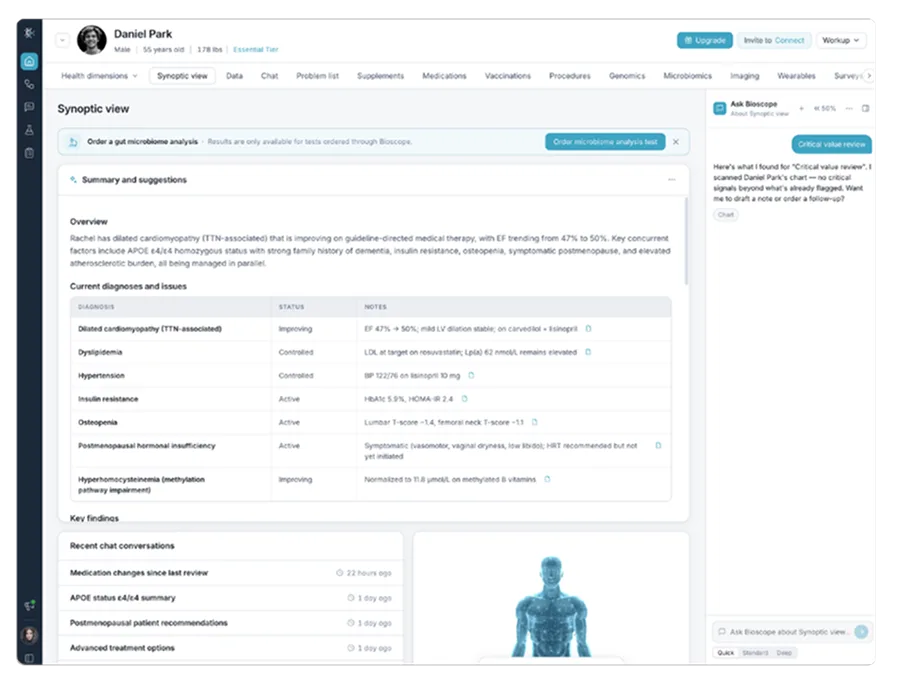
Turn Separate Reports Into a Usable Patient Profile
A new patient brings years of laboratory results, a genetic report and a list of medications. At the next appointment, there may be another scan or a change in symptoms. You need a way to work across that history, not simply somewhere to store it.
Bioscope organizes supported sources around the individual. Its dashboard offers an overview of several health dimensions, with access to underlying findings and supporting information when you need a closer look.
Start with an area that deserves attention, then examine the details behind it. A summary becomes an entry point into the record rather than the final answer.
For your practice, the benefit is a place to investigate what the available results mean together. You can build the discussion around the person instead of following the order in which documents arrived.
Your EHR remains part of the process. Bioscope's clinician-facing record sits alongside it, adding a place to work with biological findings and other available inputs. Confirm compatibility with your specific system before assuming a direct connection is included.
Explore the Bioscope platform to see how that profile is organized.
Make Room for the Information Your Practice Uses
Bring the sources relevant to your care model into the same review. Bioscope works with different types of medical and biological information, subject to the selected tier and supported integrations.
Genomics
Examine available whole-genome findings alongside medical history and current medications. Explore genetic testing interpretation software for the specific workflow around genetic results.
Laboratory History
Put new values beside earlier measurements. Having those results together gives you a starting point for discussing change and deciding what needs further assessment.
Records and Medications
Keep relevant diagnoses, previous visits, symptoms and treatment history within reach. These details provide context that a test cannot supply on its own.
Imaging
Consider supported imaging information alongside the broader chart. The scan contributes another perspective without becoming a substitute for the rest of the examination.
Wearables
Sleep, activity, heart rate and other supported measurements add information from life between appointments. Their relevance depends on the question you are investigating.
Microbiome Findings
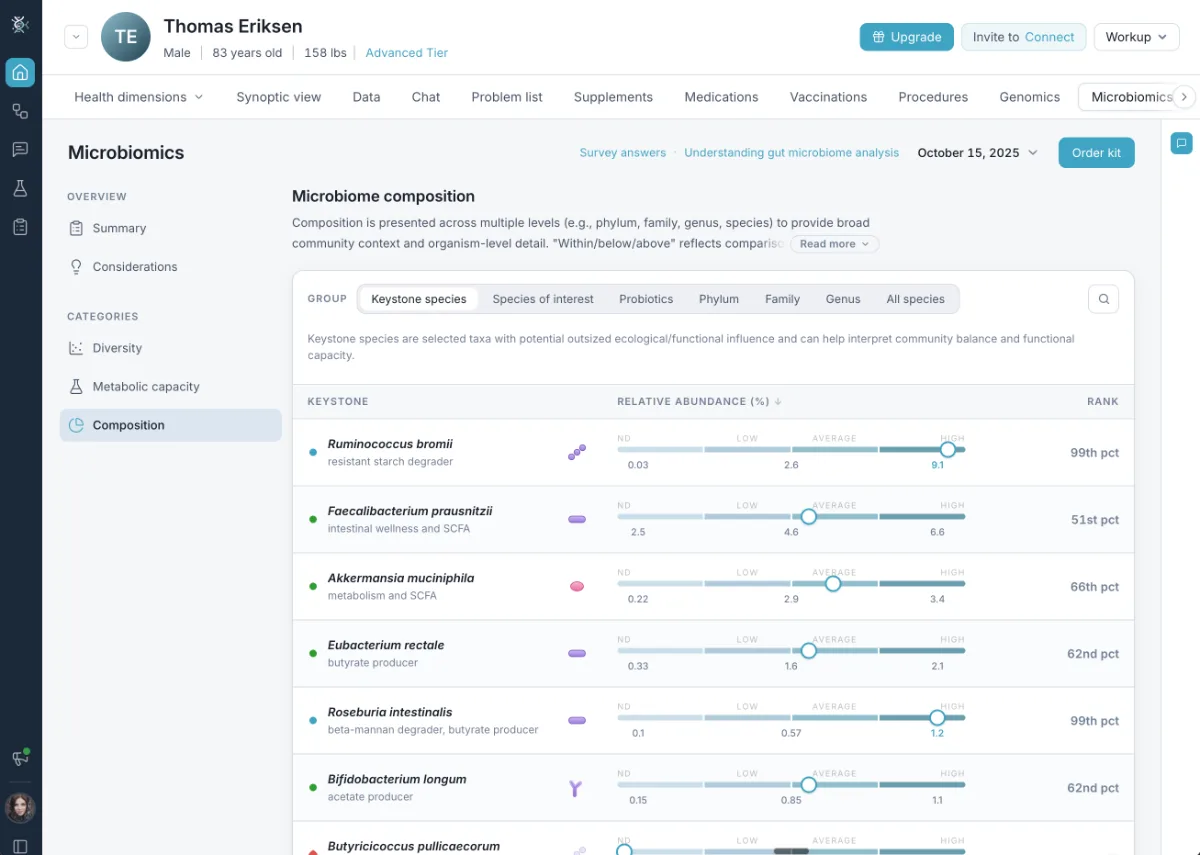
Bring available microbiome reports into the discussion with laboratory results, symptoms, medication history and lifestyle information.
The setup should match what you actually use. You do not need to assume every person has every data type, or that all outside reports receive the same analysis. Discuss your existing tests and systems with the Bioscope team before selecting a package.
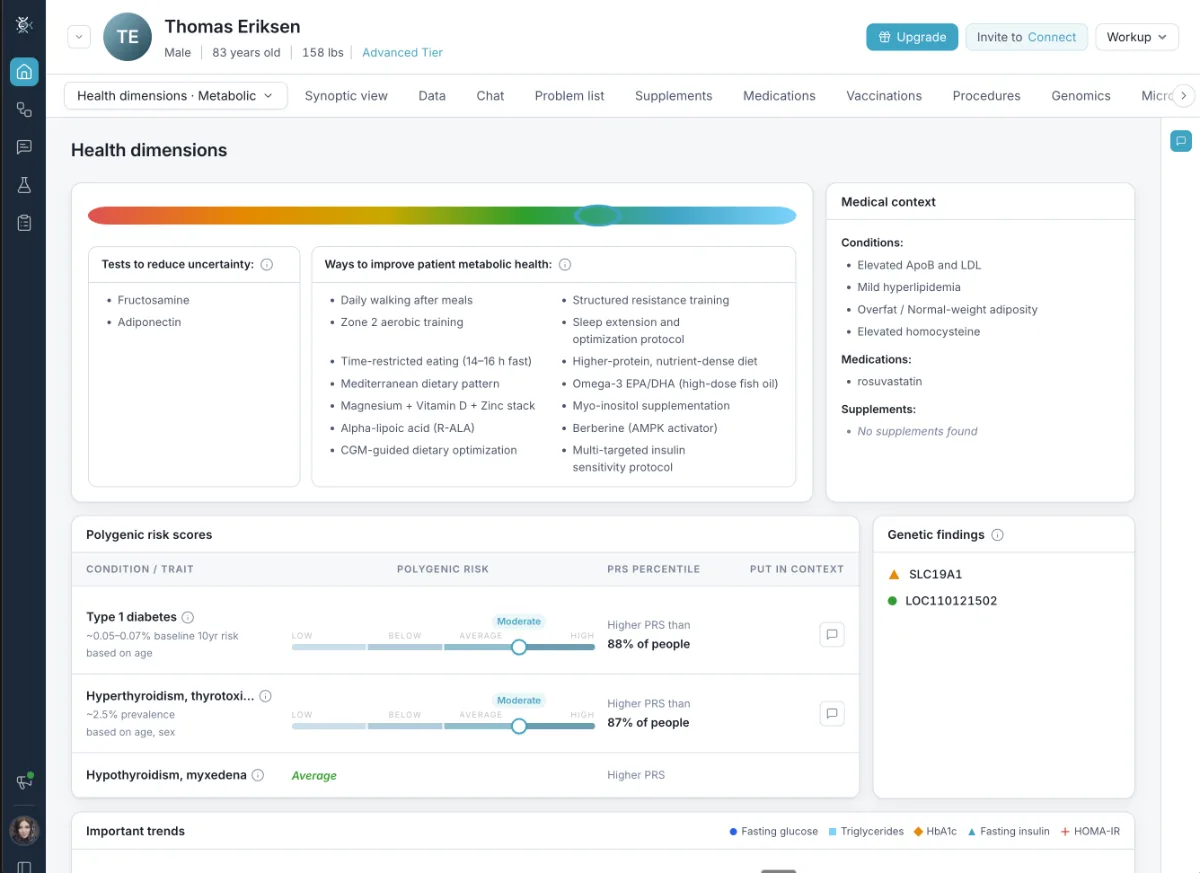
Keep the Record Useful as Things Change
Your work at one appointment should provide a foundation for the next.
As new information becomes available within the supported patient record, physicians can review it alongside earlier findings. This allows them to revisit clinical questions with additional context rather than treating every consultation as an isolated assessment.
Suppose a returning patient has a new laboratory result. You can consider it alongside what was already known, ask what else changed and decide whether more information is needed.
That continuity is useful for ongoing relationships in which care develops across several visits. It does not require treating every fluctuation as significant.
The timing and completeness of updates depend on the connected sources and available integration arrangements. Confirm these details for your intended setup.
Move From a Question to the Evidence Behind It
Use Bioscope's conversational interface to investigate a finding without losing sight of the person it concerns.
Ask about a result, explore its relationship to the available history and examine supporting information provided in the response. You can follow up on something unclear instead of treating the first answer as the conclusion.
For example, ask how a finding relates to earlier laboratory values or what evidence supports an interpretation. The purpose is to help you work through a question, not produce an instruction that bypasses your judgment.
You decide whether the sources are relevant, whether the record contains enough information and whether additional assessment is appropriate.
During a demonstration, ask to see an answer and the material behind it. That is a practical way to evaluate whether the experience fits your expectations.
Bring That Understanding Into the Visit
Make the preparation useful when the conversation begins.
Arrive With a Starting Point
Review relevant history and findings before the appointment. Identify questions worth discussing while leaving room for concerns that emerge when you meet.
Work Through What Matters Today
Explore results alongside the person's goals, symptoms and recent experiences. The record supplies background; the consultation establishes what needs attention now.
Finish With Documentation You Approve
Where documentation features are available in the selected configuration, Bioscope can support the preparation of clinical notes and patient summaries for physician review.
You remain responsible for checking the accuracy of the information, editing the draft where necessary and approving the final documentation.
Your patient should leave with an explanation that reflects the discussion, not an unedited software response. Use the reviewed summary to communicate the findings you have assessed and the next steps you have agreed together.
This supports the work around the appointment without handing the relationship to software. The explanation, recommendations and agreed next steps remain yours.
For a broader look at preparation and follow-up, explore AI clinical workflow software. A demonstration can show how these capabilities relate to the way your team currently works.
Schedule a Demo
See the experience for yourself and discuss the right setup for your practice.
Schedule a DemoChoose the Right Setup Before You Commit
Know what your practice is buying before enrollment.
Bioscope offers platform tiers with different testing and analysis options. Review the capabilities included in your proposed package, the sources you intend to connect and the costs that apply.
External omics reports may be handled differently from tests ordered through Bioscope. Confirm which information can be used for contextual review and which analysis features require specific testing arrangements.
The platform also separates currently available functions from features on its roadmap. Base your purchase on what is available today.
Bring your requirements to the discussion: the tests you order, the systems your staff uses and the type of consultations you provide. Ask the team to explain any testing or integration charges before you proceed.
Review the Bioscope platform and request a setup that reflects your actual needs.
Keep Your Expertise at the Center
Adopting Bioscope adds a tool to your practice, not another decision-maker.
The software helps organize findings and provide evidence for assessment. Diagnosis, treatment and responsibility for care remain with the physician.
Use your examination, the patient's account and professional judgment to determine what is appropriate. Missing records, uncertain findings or limited evidence may require further investigation rather than an immediate recommendation.
The patient profile is not a complete biological replica and should not be treated as a guarantee of future health or treatment response.
For teams delivering precision medicine, this keeps individual assessment at the center while making detailed information available for use.
Explore the Platform
Review the Bioscope platform and see how the connected patient profile is organized.
Schedule a Personalized DemoSee Bioscope Working Before You Decide
The next step is a demonstration, not a commitment based on a feature list.
Explore a sample record, see how questions are handled and follow the path from findings to physician-reviewed documentation. Discuss the information your practice needs and confirm which functions your proposed package includes.
For a first evaluation, describe a typical case without sharing identifiable patient information. Explain what makes that case difficult to manage today and which parts of the current process you would like to improve for your team.
Bring your clinical lead or practice manager so the evaluation covers both the consultation and the operational requirements.
Use that discussion to establish scope, clarify costs and decide whether Bioscope fits the care you deliver.
Explore the connected profile behind the Bioscope Patient Digital Twin concept and take the next step toward bringing the platform into your practice.
See Bioscope.ai Working for You
Schedule a demonstration to explore a sample patient record, review the available capabilities and discuss how Bioscope could fit your practice.